FreeForexTools

Trend

MT4 Expert Adviser

AI Gold Sniper MT4

AI Gold Sniper EA MT4 Free Download – The Ultimate Smart Gold Trading Robot AI Gold Sniper EA MT4 is one of the most advanced gold trading robots designed exclusively for XAUUSD (Gold) on MetaTrader 4. Available for free download at FreeForexTools.in, this Expert Advisor (EA) combines AI-based trading logic, advanced risk management, and a smart news filter to help traders make accurate and safe trading decisions. Whether you are trading for personal profits or attempting prop firm challenges, AI Gold Sniper EA offers a highly flexible and intelligent trading system.  What is AI Gold Sniper EA MT4? AI Gold Sniper EA is an artificial intelligence-powered Expert Advisor built for MetaTrader 4, focusing solely on XAUUSD (Gold) trading. The EA uses GPT-4o models, deep learning techniques like CNN, RNN, and reinforcement learning, analyzing historical price data, macroeconomic indicators, and real-time news. Unlike risky grid or martingale strategies, AI Gold Sniper EA prioritizes capital protection while maximizing profitability. The EA dynamically adapts to market conditions using a combination of technical analysis, sentiment analysis, and fundamental indicators. 👉 Vendor Website: Click Here Key design claims include: No use of martingale, grid, or other dangerous strategies.  Only one trade at a time. Every trade is protected by stop loss. Smart time filters or news filter to avoid trading during volatile events.  Backtested from 2003–2024 using “every tick” data with high modeling quality. Works best on timeframe H1 (1 hour).  While these sound attractive, claims must always be taken cautiously (especially in automated trading). In the sections below, we parse the settings, consider pros and cons, and suggest best practices. At FreeForexTools.in, we provide the best collection of free forex robots, indicators, and Expert Advisors (EAs) for both MetaTrader 4 (MT4) and MetaTrader 5 (MT5) platforms. One of the most popular downloads is the AI Gold Sniper EA MT4, a prop-firm ready automated trading system with verified results. Table of Contents Share Now AI Gold Sniper EA MT4 Welcome to our complete guide on AI Gold Sniper EA MT4, a gold-trading Expert Advisor (EA) built for MetaTrader 4 that claims to harness cutting-edge AI models and smart risk filters. In this deep dive, we examine its settings, strengths & weaknesses, performance claims, and practical tips for live deployment.  Who Developed AI Gold Sniper EA? The EA is developed by Ho Tuan Thang, a Forex EA developer with over 9 years of experience on MQL5. He has created multiple successful EAs including: Advanced Triangle Trading MT4 Quantum HFT Prop Firm AI Indices Scalper AI Gold Sniper (Top-performing EA) Ho Tuan Thang focuses on creating safe, profitable, and prop-firm friendly Expert Advisors for traders worldwide. Key Features of AI Gold Sniper EA Account & Risk Management Hard Stop Loss: Default 0 (can be customized) Stop Trading After Hard Stop Loss: Enabled Stop New Orders via Panel: True Auto Risk (%): 10% maximum Fixed Lot Size: 0.01 (conservative) This makes AI Gold Sniper EA prop-firm challenge ready, allowing traders to manage drawdowns effectively.  Basic Trading Parameters Order Comment: AI Gold Sniper Magic Number: 140425 (unique trade identifier) Auto Risk Lot Size: Optional Traders can use fixed lots or enable dynamic risk scaling depending on account size and risk tolerance. Chart & Display Settings Panel Info: True Draw Profit on Chart: True Font/Colors: White, Green, Maroon, DarkOrange Font Size: 20 AI Gold Sniper EA provides a user-friendly interface that makes tracking trade performance straightforward.  News Filter High Impact News: True Medium/Low Impact News: False Stop Before News: 15 minutes Resume After News: 15 minutes The advanced news filter protects your trades from sudden volatility during major events.  Additional Features Symbol List: USD default, customizable Broker Time Usage: Trades are synced with broker server time Compatible with multiple instruments beyond gold  Why Use AI Gold Sniper EA? AI-Powered Trading: GPT-4o + deep neural networks analyze market data for accurate signals Dynamic Market Adaptation: Reinforcement learning adjusts strategies automatically Risk Management: Stop loss protection, no martingale/grid Cross-Market Analysis: Gold, USD Index, bonds, and commodities correlations Proven Reliability: Monte Carlo backtesting at 99% quality, Sharpe ratio > 2.3 Flexible Usage: Works on multiple timeframes; H1 recommended  Recommended Trading Specifications Parameter Value Platform MetaTrader 4 Currency Pair XAUUSD (Gold) Timeframe H1 Minimum Deposit $500 / 0.01 lot Leverage 1:100 or higher Setup Files Default settings Product Type Unlimited / No DLL / Free 1 Year Updates Recommended Brokers Exness, ICMarkets, Tickmill, RoboForex VPS Recommended (FXVM, Lite, Basic, Advanced, High-Freq)  Installation Guide for AI Gold Sniper EA Open MetaTrader 4 Go to File → Open Data Folder → MQL4 → Experts Copy AI Gold Sniper v1.4.ex4 into Experts folder Restart MT4 Attach the EA to XAUUSD H1 chart Enable AutoTrading Download the EA directly from FreeForexTools.in. AI Gold Sniper EA Trading Results   Broker: Weltrade Leverage: 1:500 Profit: 406% Maximum Drawdown: 8.7% Trading Activity: 100% algo trading Loss Trades: 0% Profit Trades: 100% The EA is tested extensively and live trading verified.  Advantages Over Other Gold EAs No Risky Methods: No martingale, no grid Automatic Trading: 100% automated Smart Time Filters: Avoids market gaps and spikes Cross-Market Analysis: Considers macroeconomic factors for better entries Long-Term Consistency: Backtested from 2003–2024 with 99% tick quality  Download & Free Access Get the AI Gold Sniper EA v1.4 MT4 free from FreeForexTools.in.It comes with: Unlimited use No DLL required  Conclusion AI Gold Sniper EA MT4 is a next-generation gold trading robot for both personal and professional traders. Its combination of AI logic, risk management, and news filters provides a safe and profitable trading strategy for XAUUSD. Download now from FreeForexTools.in to start trading gold with AI precision! How to Install AI Gold Sniper Robot (Step by Step) Download the EA package from FreeForexTools.in. Open MetaTrader 4 (MT4) → Click File → Open Data Folder. Copy the .ex4 file into the Experts folder. Copy .set files into the Presets folder. Restart MT4 and attach the EA to your M1 chart (US30 / NAS100 / DAX). Load the correct Set File according to your account size. Enable AutoTrading

AI Gold Sniper EA
, , , , , , , , , , , , , , , , , , , , , , , , , , , , , , , , , , , , , , , , , , , , , , , , , , , , , , ,

AI Gold Sniper MT4 Read Post »
Blog

Why Gold Price Increase in 2025

Why Gold Price Increase in 2025 Why Gold Price Increases?  A Complete Trading & Investment Guide Gold has been the world’s most trusted asset for centuries. From being a store of value during wars to becoming the backbone of central bank reserves, gold continues to shine as a safe-haven asset. But what really drives the gold price increases that we see year after year? For forex traders, investors, and even beginners learning forex trading, understanding the reasons behind gold price movements is essential. Whether you are using free forex tools, forex EAs, or following economic news forex calendars, knowing the drivers of gold can improve your strategies. In this detailed guide, we’ll cover: Economic factors behind rising gold prices How forex trading strategies link to gold (XAU/USD) Role of Smart Money Concept (SMC) in gold markets How to trade gold using indicators, EAs, and scalping systems Future outlook of gold for 2025 and beyond 1. The Role of Economic Uncertainty in Gold Price Hikes Gold thrives during uncertain times. Whenever there is economic instability, investors seek gold for safety. Forex market analysis shows that when stock markets crash, gold prices surge. Traders using intraday forex strategies often scalp gold during crises. Non repaint indicators and trend reversal indicators on MT4/MT5 quickly detect sudden gold moves. For swing trading strategies, gold is a perfect long-term hedge. Example: During the 2008 financial crisis and the 2020 pandemic, gold prices reached record highs. 2. Inflation and Currency Weakness One of the strongest reasons for gold price increases is inflation. When inflation rises, the value of fiat currencies like USD decreases. Investors move into gold, which holds real value. In price action trading, gold often forms bullish trends during inflationary periods. Support and resistance strategies on MT4/MT5 help traders identify gold entry zones. Forex scalping strategies often take advantage of inflation reports like CPI and PPI data from the forex calendar events. 3. Central Banks and Smart Money Concept (SMC) Central and Government banks play a key role in gold demand. When banks buy large quantities of gold, it pushes the price up. This aligns with the Smart Money Concept (SMC), where institutional money moves markets. Traders can use SMC indicators, supply and demand tools, and forex robots to trade these accumulation phases. Many forex broker reviews suggest brokers with low spreads for trading gold via EAs.  4. Geopolitical Tensions: War, Sanctions, and Gold Whenever there is war, sanctions, or global instability, gold becomes the ultimate safe haven. Traders using best scalping indicators look for gold breakouts during major news events. Forex signals often recommend buying gold during conflicts. Currency market news almost always ties geopolitical updates with gold’s reaction. For intraday forex strategy, volatility in gold is highest during geopolitical announcements.  5. Supply, Demand, and Market Sentiment Apart from global events, physical demand for gold also impacts its price. Jewelry demand in countries like India and China affects global prices. Technical analysis books often explain how gold’s demand cycles influence charts. Chart patterns forex strategies like triangles and wedges often signal breakout moves in gold. Traders who use free forex indicators and MT4 EA downloads can automate trading around these cycles.  6. Technical Analysis of Gold Gold is one of the most heavily traded commodities, making technical analysis highly effective. MT4 indicators free download and MT5 indicator downloads provide multiple gold trading systems. Popular tools include: Moving Averages (trend following) RSI/MACD (momentum indicators) Non repaint trend reversal indicators Support & Resistance levels Forex scalping strategies on gold often combine trend indicators with price action trading.  7. Automated Trading: Forex EA and Gold With high volatility, gold is perfect for forex robots. Free forex EA downloads often include gold scalping bots. Best scalping EA for MT4/MT5 can handle XAU/USD trades with high accuracy. Forex EA reviews show that gold-focused robots often outperform those built for currencies. Automated systems eliminate emotions, making gold trading more efficient.  8. Gold as a Hedge in Forex Trading For forex beginners, gold acts as a hedge against risky currency pairs. If USD weakens, gold usually strengthens. Many forex broker reviews recommend brokers with gold-friendly trading conditions. Free forex courses and forex eBooks highlight gold as a diversification tool. By combining swing trading strategies with gold, traders reduce portfolio risk.  9. Key Fundamental Events Affecting Gold Gold traders must always track economic news forex events: Federal Reserve Interest Rate Decisions Non-Farm Payroll (NFP) Inflation Reports (CPI, PPI) Global Currency Market News Many traders rely on forex calendar events and use MT4 indicators to prepare for these moves. 10. Will Gold Keep Rising in 2025 and Beyond? Many analysts expect gold to remain bullish in the long term due to: Ongoing inflation pressures Central bank buying Geopolitical instability Currency debasement Traders who use best forex indicators, forex tool comparisons, and scalping systems will continue to find gold a profitable market.  Conclusion The answer to “Why Gold Price Increases” lies in a mix of economic uncertainty, inflation, central bank policies, and geopolitical tensions. For traders, combining: Smart Money Concept (SMC) Price Action Trading Forex Robots & EA Technical Indicators (MT4/MT5) …creates a powerful gold trading strategy. If you are a beginner, start with free forex books, forex trading courses, and demo EAs before moving to live gold trading. Gold has always been a safe-haven investment, and with proper forex trading strategies, it can be one of the most rewarding assets in your portfolio.   Share Now

Why Gold price increase
, , , , , , , , , , , , , , , , , , , , , ,

Why Gold Price Increase in 2025 Read Post »

Blog

Protects Account from Unexpected Moves in Forex Trading – A Complete Guide

Protects Account from Unexpected Moves in Forex Trading  A Complete Guide 1.0  Introduction If you’ve been trading Forex for a while, you already know one truth: the market doesn’t always move the way we expect. A simple news update, sudden interest rate decision, or geopolitical tension can cause a huge price swing in seconds. Many traders lose their accounts not because they’re bad at analysis, but because they don’t know how to protect their money from unexpected moves. In this article, we’ll go beyond the basics and talk about practical, advanced but easy-to-use strategies that will help you safeguard your account, manage risk like a pro, and survive in any market condition. 2.0 Why Unexpected Moves Are Dangerous The Forex market trades 24/5, and during this time, several things can trigger volatility: Economic news like Non-Farm Payrolls (NFP), CPI, or central bank speeches. Liquidity gaps during market opening and closing hours. Broker slippage when spreads suddenly widen. Emotional reactions from traders chasing the market. If you’re not prepared, one wrong trade can wipe out weeks or even months of gains. That’s why protection must always come before profit. 1.1  The Power of Stop-Loss – Your Safety Net A stop-loss is not just a tool—it’s your insurance in the Forex market. Always set a stop-loss before placing a trade. Avoid setting it too close; the market often makes small fake moves. For better results, place your stop-loss beyond key support/resistance zones. 👉 Pro Tip: Use a trailing stop-loss. Once your trade is in profit, the trailing stop automatically locks some profit if the market turns. 1.2  Smart Risk Management – Trade Small, Trade Smart The fastest way traders blow accounts is by risking too much on one position. Professionals follow the 1–2% rule: If your account balance is $1,000, risk only $10–20 per trade. Keep lot sizes realistic, especially when using high leverage. Think long-term: it’s better to survive 100 trades with small risk than blow your account in 3 trades. ✅ Advanced tip: Use a position size calculator to avoid guessing lot sizes. 1.3  Hedging and Diversification – Don’t Put All Eggs in One Basket Unexpected moves don’t affect all pairs equally. That’s why diversification helps. If you’re long EUR/USD, you could hedge with a short EUR/GBP position. Gold (XAU/USD) often moves opposite to USD pairs—making it a good hedge. Trade multiple pairs instead of focusing on just one. This way, even if one trade fails, another might cover the loss. 1.4  Be Careful During News Events High-impact news is like a storm. Even if your analysis is correct, spikes can hit your stop-loss before going your way. Always check the Forex economic calendar before entering trades. If you’re not an advanced news trader, avoid opening trades 30 minutes before big events like NFP or FOMC. If you want to trade news, use smaller lot sizes and wider stops. 1.5  Expert Advisors (EAs) with Built-In Protection Many traders now use automated robots (EAs) that apply strict rules without emotions. A good EA can: Limit maximum daily loss. Close trades if volatility spikes. Automatically manage trailing stops. 🔗 Try these free EAs on our site: EA Gold Stuff MT5 Free Download Black Wolf EA MT4 Free Download Best Scalping EA for MT4 Top Free Forex Indicators for MT5 1.6  Control Your Leverage – Less is More Leverage is a double-edged sword. With 1:1000 leverage, a small market move can double your account—or wipe it out. Beginners should stick to 1:10 – 1:30 leverage. Advanced traders can use higher leverage, but only with strict stop-loss rules. Think of leverage as a tool, not a shortcut to get rich. 1.7  Master Your Emotions – The Hardest Protection Even with the best strategy, fear and greed can destroy accounts. Create a written trading plan and follow it. Set daily profit and loss limits. If you feel emotional after a loss, stop trading for the day. 👉 Trading is not about winning every trade. It’s about staying in the game long enough to grow consistently. 2.0 Conclusion Protecting your account from unexpected moves is not an option—it’s a must. By combining stop-loss orders, smart risk management, diversification, EA automation, and emotional discipline, you can trade safely and confidently. Remember: profits are temporary, but capital protection is forever. 📌 Related Posts You May Like EA Gold Stuff MT5 Free Download Black Wolf EA MT4 Free Download Best Scalping EA for MT4 Top Free Forex Indicators for MT5 ✅ FAQ – Protecting Your Forex Account Q1. Can I trade Forex without a stop-loss?No. Even professional traders use stop-loss. Without it, one bad move can wipe out your account. Q2. What leverage should beginners use?Between 1:10 and 1:30 is safest for protecting your capital. Q3. Do Expert Advisors really protect accounts?Yes, some EAs include built-in features like max daily loss, auto-stop, and volatility filters. Q4. How can I avoid losses during news events?Check the economic calendar, close trades before major news, or use smaller lot sizes. Share Now

Protects-Account-from-Unexpected-Moves-in-Forex-Trading
, , , , ,

Protects Account from Unexpected Moves in Forex Trading – A Complete Guide Read Post »

MT5 Expert Adviser

GOLD STUFF EA MT5 FREE DOWNLOAD

EA Gold Stuff MT5 is a professional Expert Advisor created by Vasiliy Strukov, one of the most well-known developers on MQL5.
This EA is built exclusively for Gold (XAUUSD) trading and is based on the Gold Stuff Indicator.

GOLD STUFF EA MT5 FREE DOWNLOAD
, , , ,

GOLD STUFF EA MT5 FREE DOWNLOAD Read Post »

MT4 Expert Adviser, Blog

NESCO EA Review

NESCO EA – The Smartest 2025 AI Forex Robot for MT4 & MT5 | FreeForexTools.in Introduction Welcome to FreeForexTools.in! Meet NESCO EA, a next‑generation, fully‑automatic Forex robot engineered for MetaTrader 4 and MetaTrader 5 (MT4 & MT5). Built on the advanced logic of GPT‑4 Copilot and optimized using the MQL5 Cloud Network, NESCO EA stands out as one of the smartest and most versatile automated trading solutions of 2025 NESCO EA – Fully Automatic Forex Robot (MT4/MT5)   Whether you’re a beginner trader wanting “set and forget,” or an advanced user looking for multi‑strategy diversification, NESCO gives you the tools and automation to trade hands‑free — running 24/5, monitoring global financial news, and sending alerts only when you need to step in. What is NESCO EA? (Overview)   NESCO EA is a fully automatic Forex Expert Advisor for MT4 & MT5 that: Operates continuously (five trading days a week, 24 hours) without manual intervention Analyzes markets using AI‑powered methods (GPT‑4 Copilot logic) Trades multiple strategies simultaneously, diversifying risk and opportunity Integrates economic news and live events via its own server feed Sends phone or push notifications when user attention is required Installs and runs quickly, compatible with other EAs and custom setups It’s designed to adapt, evolve, and work even when you’re not watching. Share Now Table of Contents Share Now If you’re searching for a powerful, hands-free Forex robot, NESCO EA is your answer. Key Features of NESCO EA Feature Benefit 100% Automatic No manual trading needed; ideal for those who can’t monitor charts constantly. AI‑Powered Market Analysis GPT‑4 Copilot logic gives smarter signal evaluation and decision making. Global Financial News Feed Keeps EA informed of major economic events that might shift the market. Multi‑Strategy Execution Uses several independent strategies at once for better balance across different market conditions. Notifications to Phone Only when important — helps you sleep, live, or work without worrying. Fast & Easy Setup Ready in under 2 minutes; minimal fuss to begin trading. Compatible with Other EAs Run NESCO alongside your other robots, indicators, or custom tools. Stable 24/5 Operation Best when run on a VPS for continuous connectivity, low latency, uptime. The EA operates on platforms like MetaTrader 4 (MT4) and MetaTrader 5 ( MT5), which are widely used by forex traders due to their robust features, ease of use, and support for automated trading. Once activated, the Smart Hub AI Robot EA can trade without the need for human intervention, making it an ideal solution for traders who want to automate their strategies and capitalize on frequent market fluctuations. Seller Link Trading Conditions & Requirements Here’s what you need to know to get the best from NESCO EA: Minimum Deposit: $100 (or equivalent in your local currency) Leverage: Starting from 1:30 or as permitted by your broker/regulator Hosting: VPS recommended for best performance (minimize downtime, latency) Maximum Allowed Spread: 20‑25 pips (or the equivalent/corresponding to your broker) Risk & Compatibility: Fully adjustable risk settings; works in tandem with other EAs NESCO EA – AI Forex Robot MT4 Free Download Installation & Setup Guide Getting started with NESCO EA is simple. Follow these steps to install and begin trading: Launch MetaTrader (MT4/MT5). Add the news server to the list of allowed URLs (you’ll be prompted on first launch). Attach NESCO EA to the EURUSD chart on the M5 timeframe (or another pair/timeframe if you prefer). In the input settings, choose your risk level — LOW, MID, or HIGH. Enable individual strategies as desired, or run all strategies by setting Stenvall_RUN=true. Confirm settings, click OK, enable AlgoTrading, and your robot starts. If you need help, NESCO EA includes on‑chart instructions and developer support is available. Default Input Settings (from developer)    Default Input Settings (Developer Recommended) These are the key settings you’ll see, with what they mean and how you can tweak them: Input Setting Purpose / Description CUSTOM / AUTOMATIC RISK Choose between letting the EA adjust risk automatically or setting it manually. NAME Strategy identifier – helps you track which strategies are active. SYMBOL Currency pair(s) and timeframe. Flexible settings allow use beyond default. STABILITY FACTOR A higher value improves consistency; a lower value gives more aggressive behavior. RECOMMENDED LOT The conservative lot size suggested for safe trading under normal conditions. RUN Toggle strategy on/off. Use only the strategies you prefer. FIXED LOT & RISK Choose whether to use a fixed lot size or dynamic risk percentage. VALUE RISK / LOT Exactly define your risk or lot settings. ULTIMATE MODE Advanced mode for experienced traders seeking more performance, perhaps with higher volatility. You can modify these inputs depending on your account size, risk tolerance, trading style, and market conditions.   Overview of NESCO EA MT4 Share Now Why Choose NESCO EA?   NESCO EA – AI Forex Robot MT4 Free Download   Why Choose NESCO EA Over Other Forex Robots? There are many EAs out there, but NESCO offers several advantages that set it apart: True AI Logic ‑ not just rule‑based or heuristic; it leverages GPT‑4 Copilot style reasoning plus market news/event context. Diversified Strategy Approach ‑ you’re not relying on one single method, but many, running concurrently. Real‑Time Financial Event Awareness ‑ many EAs ignore news risk, but NESCO seeks to integrate it. User Notifications ‑ keeps you in loop when action is needed, without overloading you with noise. Ease of Use + Flexibility ‑ from beginners (plug & play) to experienced users (fine‑tune all risk & strategy settings) Related Tools & Free Resources While NESCO EA is a premium, powerful robot, here on FreeForexTools.in we also provide: Other EAs & Robots like Black Wolf EA, etc. MT4 & MT5 Indicators you can use to augment your strategy. Free trading books & courses to help you understand EA logic, risk management, strategy design. Smart HUB AI Robot, additional tools that work well in similar settings. Frequently Asked Questions (FAQ) – Scalping EA MT4 & MT5 What makes NESCO different from other MT4 EAs? NESCO integrates AI (GPT-4 Copilot), MQL5 Cloud optimization, and live financial events,

Nesco EA MT4
, , , , , , , , , , , , , , , , , , , , , , , , , , , , , , ,

NESCO EA Review Read Post »

MT4 Expert Adviser

Smart Hub EA

Smart Hub AI Robot EA Review Smart Hub AI Gold EA is a powerful Martingale Forex robot for MT4, specially designed for Gold (XAUUSD) trading. With built-in hedge protection and customizable inputs, this EA offers both high profitability and reduced drawdowns. Smart Hub AI Gold EA MT4 Free Download (Best Martingale Forex Robot 2025) Smart Hub AI Gold EA is a professional Forex Expert Advisor designed for MetaTrader 4 (MT4). This EA uses a martingale trading strategy combined with hedge protection to maximize profits while controlling risk. It is especially optimized for Gold (XAUUSD) but can also trade major currency pairs such as EURUSD, GBPUSD, and USDJPY. Smart Hub AI Gold EA is a Martingale-based Forex robot for MT4 with hedge protection. Optimized for Gold (XAUUSD), it delivers consistent results with smart risk management. Free download available. Share Now Table of Contents Share Now Overview of Smart Hub AI Gold EA MT4 What is a Smart Hub AI Gold EA MT4? Smart Hub AI Gold EA is a professional Forex Expert Advisor designed for MetaTrader 4 (MT4). This EA uses a martingale trading strategy combined with hedge protection to maximize profits while controlling risk. It is especially optimized for Gold (XAUUSD) but can also trade major currency pairs such as EURUSD, GBPUSD, and USDJPY. Unlike normal martingale robots, Smart Hub AI includes an AI-based hedge system that protects accounts from deep drawdowns. It is ideal for traders who want a fully automated solution with smart risk management. The EA operates on platforms like MetaTrader 4 (MT4) and MetaTrader 5 ( MT5), which are widely used by forex traders due to their robust features, ease of use, and support for automated trading. Once activated, the Smart Hub AI Robot EA can trade without the need for human intervention, making it an ideal solution for traders who want to automate their strategies and capitalize on frequent market fluctuations.   Key Features of Smart Hub AI EA Optimized for Gold (XAUUSD) and major forex pairs Advanced Martingale strategy with AI enhancements Hedge system for account protection during reversals Adjustable input settings for flexible money management Works on MT4 platform with any broker Suitable for cent accounts, micro accounts, and standard accounts Default Input Settings (from developer) Input Setting Starting Lot: 0.01 Pip Difference: 100 Take Profit: 8.0 Broker Commission: 7.0 Lot Multiplier Percent: 20.0 Slippage: 1 Hedge After X USD Drawdown: 1000 Hedge Position Duration: 60 minutes These inputs can be modified according to your trading style and account balance. Why Choose Smart Hub AI Martingale EA? Smart Hub AI Gold EA is designed to provide consistent results on Gold (XAUUSD). With a built-in hedge system, it reduces the risk of large losses while keeping the advantages of a martingale strategy. This makes it more reliable than normal martingale robots. It is recommended to run this EA on M15 or M30 timeframe for best performance. Traders can use it on demo accounts first before going live. Download Smart Hub AI Gold EA Free [Download Smart Hub AI EA Free for MT4] Related Forex Tools Black Wolf EA MT4 Free Download MT4 & MT5 Indicators Free Download Free Forex Trading Books & Courses   Key Features of Smart Hub AI EA Share Now   When choosing a Smart Hub AI Robot , here are the essential features to consider: Optimized for Gold (XAUUSD) and major forex pairs Advanced Martingale strategy with AI enhancements Hedge system for account protection during reversals Adjustable input settings for flexible money management Works on MT4 platform with any broker Suitable for cent accounts, micro accounts, and standard accounts Check more Now Smart Hub AI Gold EA Martingale EA for MT4 Free Forex EA download Best Gold EA 2025 MT4 trading robot free Hedge system EA FreeForexTools.in Frequently Asked Questions (FAQ) – Smart Hub AI EA What is Smart Hub AI Gold EA? Smart Hub AI Gold EA is a martingale-based Forex Expert Advisor for MetaTrader 4 (MT4). It is specially optimized for Gold (XAUUSD) and comes with hedge protection to manage risks. Is Smart Hub AI EA safe for long-term trading? Yes, compared to normal martingale robots, this EA is safer because it includes a hedge system and customizable lot size settings. However, proper risk management and broker selection are important. Can I use Smart Hub AI EA on cent or micro accounts? Yes ✅, this EA is fully compatible with cent accounts, micro accounts, and standard accounts. Many traders use cent accounts to test martingale strategies safely. Which brokers are best for Smart Hub AI EA? It works on most brokers that support MetaTrader 4 (MT4). For best results, choose a broker with: Low spreads on Gold (XAUUSD) Fast execution Cent or micro account options Does Smart Hub AI EA support auto trading 24/7? Yes, this EA is fully automated. Once installed on MT4, it runs 24/5 on forex market hours. For stable results, use a VPS (Virtual Private Server). Is Smart Hub AI EA really free on FreeForexTools.in? Yes ✅, at FreeForexTools.in you can download Smart Hub AI Gold EA for free. Our site provides free MT4 EAs, MT5 indicators, forex trading books, and courses. Can Smart Hub AI EA work on other pairs besides Gold? Yes, while it is optimized for Gold (XAUUSD), it can also trade pairs like EURUSD, GBPUSD, and USDJPY with adjusted settings. How much minimum deposit is required for Smart Hub AI EA? For cent accounts: at least $200 is recommended.For standard accounts: at least $2000 is recommended to handle martingale strategies safely. Do I need to optimize the settings of this EA? The default settings are good for testing, but for live trading you should backtest and optimize inputs like lot size, pip difference, and hedge settings according to your broker’s conditions. Where can I find more free Forex EAs and indicators? You can explore more on our site: FreeForexTools.in→ Free MT4 EAs, MT5 indicators, trading books, and premium forex resources. Smart Hub AI Gold EA is a martingale-based Forex Expert Advisor for MetaTrader 4 (MT4). It is

Smart_Hub_AI_Robot_MT4
, ,

Smart Hub EA Read Post »

MT5 Expert Adviser

Scalping EA MT5 Review

The Scalping Robot MT4 & MT5 is a fully automated trading EA designed for quick, short-term scalping. It focuses on speed, precision, and strict risk management to keep trading safe. Below is an overview of how it works, its settings, and the key factors that affect its performance

Bloack wolf EA MT4 1
, , , , , ,

Scalping EA MT5 Review Read Post »

MT4 Expert Adviser

Scalping EA MT4

The Scalping Robot MT4 & MT5 is a fully automated trading EA designed for quick, short-term scalping. It focuses on speed, precision, and strict risk management to keep trading safe. Below is an overview of how it works, its settings, and the key factors that affect its performance.

Bloack wolf EA MT4
, , , , ,

Scalping EA MT4 Read Post »

MT4 indicator

Forex Gump Indicator for MT4

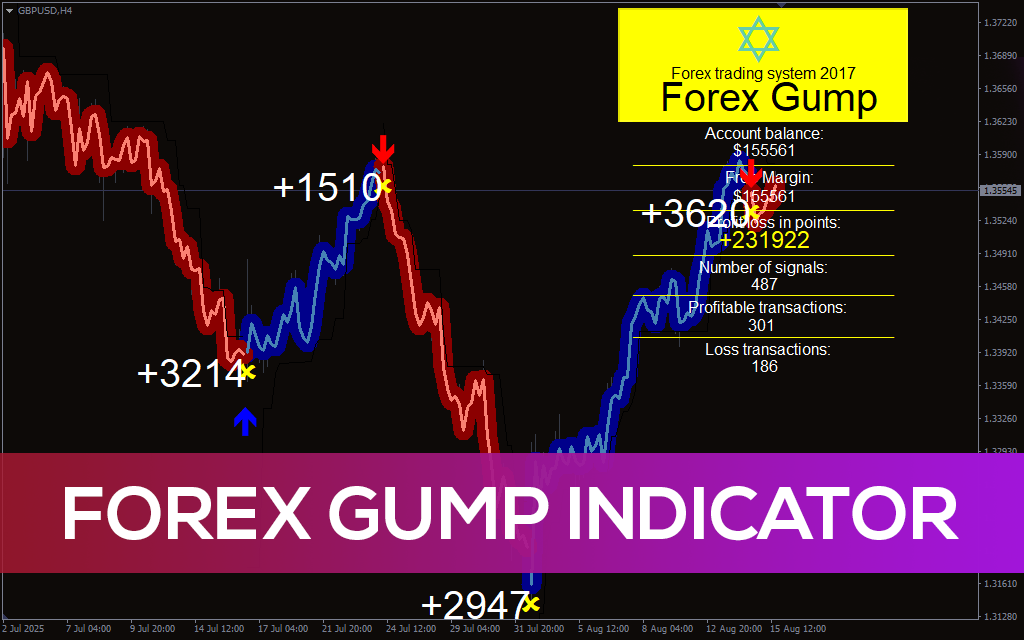
Forex Gump Indicator for MT4 Free Download Share Now     Forex Gump Indicator Discover the Forex Gump Indicator for MT4 – a powerful tool that detects profitable entry points using wave-based trend coloring and arrow signals. Forex Gump Indicator for MT4 – Accurate Buy & Sell Signals The Forex Gump Indicator is a powerful trend-following tool for MetaTrader 4, designed to provide clear and reliable trading signals. It combines easy-to-read visuals with real-time alerts, making it simple for traders to identify potential entry and exit points. Using color-coded waves and directional arrows, the indicator highlights strong buy and sell zones, helping traders capture short-term momentum with higher accuracy. With thousands of signals generated and detailed performance statistics, it offers both beginners and advanced traders a practical solution for improving trade timing while reducing market noise. This indicator has become popular in the Forex community due to its user-friendly design, precision in fast-moving markets, and effectiveness in detecting trend reversals.                                                                         Forex Gump Indicator – Buy & Sell Trading Signals for MT4 The Forex Gump Indicator generates precise entry signals on the MetaTrader 4 platform using color-coded trend zones and directional arrows. When the chart displays a red zone with a downward arrow, it signals bearish momentum and a potential sell opportunity. On the other hand, a blue zone with an upward arrow highlights bullish momentum, suggesting a buy entry. Trades are typically confirmed when the price moves into a new zone and the arrow aligns with the trend. To track performance, yellow crosses appear on the chart, marking completed trades and making it easier to evaluate signal accuracy. This combination of trend zones, arrows, and performance markers allows traders to make quicker and more confident decisions, without relying on lagging indicators. Profits are displayed directly on the chart in points, giving traders a clear and instant view of results. ConclusionThe Forex Gump Indicator offers a highly visual and user-friendly solution for traders looking to identify profitable entry and exit points. With its automatic statistics display, trend-colored waves, and clear directional arrows, this indicator reduces guesswork and supports consistent decision-making. While it’s best used in trending markets, it can also perform well in short-term trading with proper risk management. Its clean integration into MT4 makes it a favorite among traders who value clarity, automation, and performance tracking in one tool.   Forex Gump Indicator Parameters Explained InformationThis option controls whether detailed performance statistics are shown directly on the MT4 chart. When enabled, traders can view real-time data such as profit/loss, number of generated signals, and win/loss ratio. Keeping this parameter set to “true” provides transparent tracking of the indicator’s past performance. Short_WaveThe Short_Wave setting (default value: 2.0) determines the sensitivity of the wave filter. A higher value smooths out wave colors, reducing small fluctuations, while a lower value increases responsiveness but may introduce more noise. Traders can adjust this based on their preference for clarity versus signal frequency. PeriodThis parameter defines the internal smoothing period of the indicator. With the default set to 1, the system becomes highly responsive to price movements, making it ideal for scalping strategies and short-term trading. Period_MaThe Period_Ma setting (default: 22) controls the moving average baseline used for detecting the overall trend. This parameter helps structure the indicator’s wave patterns and assists in identifying medium-term trend reversals with greater accuracy. Share Now GET IT NOW FREE

Forex Gump Indicator pre1
, ,

Forex Gump Indicator for MT4 Read Post »

MT5 indicator

Buy-Sell Indicator MT5

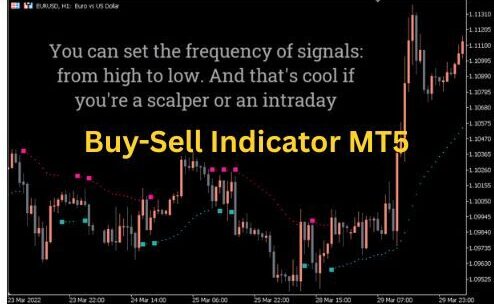
Buy-Sell Indicator MT5 Free Download Share Now     Buy-Sell Indicator for MT5                                                                        Simple & Accurate Signals The Buy Sell Indicator for MetaTrader 5 (MT5) is one of the most reliable tools for traders who want clear and easy-to-understand signals. It is designed to highlight buy and sell opportunities on your chart with straightforward alerts. This indicator also works as an accurate trend reversal detector, helping traders spot potential turning points in the market with high precision. Whether you’re a beginner or an experienced trader, this MT5 tool makes decision-making simpler and faster. Categories: Trend Indicator, Signal Indicator, MT5 Tools What is Buy-Sell indicator MT5?   Using some indicators to trade can sometimes be confusing. Mastering the numerous lines, colors, and numbers is an uphill task. Fortunately, one indicator simplifies Forex trading for you. We present to you the Buy Sell indicator. About Buy-Sell indicator MT4 The Buy Sell indicator for Metatrader 5 is a combination three indicators and custom price action filter. It does not feature distracting bands, histograms or lines. It only comes with non-repaint signals which tell you when to buy and sell. Besides the entry points, it also provide suitable exit points. This makes it suitable for both novice and experienced traders. Here is another crucial point. The Buy Sell indicator is ideal for lower time frames (M1, M5, M15, M30) during the London and New York sessions when the market is more volatile. The best part is that you can use it to trade any currency pair. However, it is not advisable to use the indicator on holiday and during major economic news. How is the indicator used, you ask?   How to Trade Using Buy Sell Indicator   Buy Signal The indicator shows a seagreen square, signaling that it is time to enter a long position. A screen alert pops up to ensure to identify the signal in real time. The best part is that the indicator calculates stop loss for you. All you have to do is to fill in the order. Alternatively, you can place the stop loss just below the grey dotted line. Where should you exit the trade? Well, you set the take profit using the 3:1 reward ratio. In other words, you can set your own profit target,let’s say 50 pips. Also, you can wait for the indicator to post a bearish signal and exit the buy trade. Sell Signal Open short position when the indicator displays a pink square and a sell alert. The pop-up alert also displays a suitable sell stop. Also, you can use a tighter stop loss by setting it just above the dotted line. If you are not sure about setting your own take profit, simply exit when the indicator posts a buy signal. Buy Sell indicator for MT5  is a great technical analysis tool for simple and straightforward trading. The chart above displays a EUR/USD price movement. The pink square indicates a suitable point to enter sell position. You can place stop loss on the dotted pink line which acts as resistance. The seagreen square indicates a suitable buy signal. The blue dotted line acts as support and suitable stop loss. Conclusion Buy Sell indicator provides the excellent signal to enter short and long positions. It does not require any complicated analysis. All you have to do is identify the seagreen and pink squares and check for recommended stop loss on the alert. What’s more it is available for free. It is prudent to supplement the indicator with more analysis. Buy-Sell indicator MT5 Setting MA Period: Period of calculating the signal. You can extend the period to delay the signal and, in turn, pinkuce number of false signals Smoothing Method: You can choose smoothing method from simple, exponential, etc Price: Choose the price type between Open, Close, High, Low, etc. ATR_Period: Period of the ATR.   GET IT NOW FREE Share Now

Buy sell indicator MT5 e1756528767442
, , , ,

Buy-Sell Indicator MT5 Read Post »

Scroll to Top